Pages

Friday, September 25, 2015

Blog Reboot and Xamarin


How many blogs must there be where the author started blogging and then author just stopped posting. I never thought it happen to me. I enjoyed blogging, yet nearly 2 years ago I stopped. For me it was a new employer for whom I was hired on to work as an consultant, After being hired I was told the company was worried how its clients would react to my blog so I was to immediately stop blogging. 

No big deal I thought, I didn't want to rock the boat at a new job so I stopped blogging. Looking back now that should have sent alarm bells screaming in my head but it didn't at the time. 

Fast forward a year and I had left that job due to the stress of my employer blatantly misrepresenting itself, its bad practices and then expecting me to lie to our clients. It was a stressful time, not so much because of the clients but due to the corporate consulting culture of just placing a consults in positions that in no way matched their skills.  Just so they could charge the client those "expert consultant fees" for a just graduated novice being paid a fraction of what they charged the client.

Finding a Great Company

I left the consultant culture to work for a small company full of great people called Road Id. Its been busy but rewarding, many of our customers email Road ID to tell us how our products have really saved lives.

I have tons of blog post material I've created there the last 2 year, some highlights that come to mind. 
  • Migrate to Azure from Rackspace
  • Design and built a scaling back-end for the Road ID Mobile App
  • Built service layer and repository pattern around Entity Framework
  • Replaced internal winforms app with a Angular Single Page App

On top of that I've become a father and there is no words to describe how much I love my son nor how little sleep I got those first 3 months after he was born.  About the same time my son was born my old domain  "ChrisTowles.com" expired and someone snagged it. I tried purchasing it back but no luck. So i'm climbing the search engine ranks again with a new domain name. 

Blog's Future 

I wanted update this blog because right I have been working with a amazing technology stack that I really have high expectations of it and more importantly of what I can do with it. That technology is Xamarin and what the Xamarin team has built is amazing. 

While I'll follow this post up with more details on Xamarin the bottom line is you can build native Android and iOS apps in C# and use Visual Studio to do it. For me that means using the language and IDE I am most productive with and conformable using to make quality mobile apps. 

I expect many future blog posts on Xamarin Development to share my journey from Xamarin Novice to Expert.

Tuesday, February 5, 2013

Create a Pharos Uniprint Logon Script to resolve ADLDAPLogon.exe Short Falls

I got a few calls from users complaining about our Pharos Clients getting "The username and password could not be authenticated against any servers" error Message. Now while a lot of users where getting this error it was only a small percentage of the over all print jobs. After digging around and putting a call into Pharos Support I noticed that this wasn't just a recent start of errors but rather common. If you want to check for it you can search your alerts or table or use Pharos administrator to and a Custom filter on the alerts.

SELECT        TOP (100) PERCENT message, username, client, time
FROM            dbo.alerts
WHERE        (message LIKE '%The username and password could not be authenticated against any servers%')
ORDER BY time DESC

Cause


Turns out the ADLDAPLogon.exe basically just don't do much checking as to why a username failed. From what testing I did I turns out the following all return the same error.
  • If the username appended with any  SMTP Address of @domain.com to the username
  • If the username is incorrect in that no account in Pharos with that name exists.
  • if the username doesn't match AD
  • .... I'm sure there are others.

Solution 

As such I talking with the Pharos Support Rep they could write a Plug-in that called ADLDAPLogon.exe but that it would be a charged Service on their part. As such I wrote my own this morning and figured I'd share.

The following Script will do the following check and then check if the username and password are correct.

  • Confirm that the Username exists in the Pharos Database
  • That the PlugIn.UserName is not empty
  • That the PlugIn.Password is not empty
  • Remove any @domain.com from the username
This script does require that ADLDAPLogon.exe is in place and configured correctly.

Then Create the Script in under system. Go to your bank, and change the Logon event from useing ADLDAPLogon.exe to use the newly created Logon Script instead. Do a change control and you done.


Good luck and feel free to  use and modify this script to fit your needs. 


//  PlugIn Script: Logon - NKU ADLDAPLogon.exe
// 
//  Billing PlugIn to allow stripping the username of @domain.com before passing to adldaplogon.exe 
//~~~~~~~~~~~~~~~~~~~~~~~~~~~~~~~~~~~~~~~~~~~~~~~~~~~~~~~~~~~~~~~~~~~~~~~~~~~~~~~~~~~~~~~
//  Project:        Pharos 8.3
//  Design:         NKU
//  Date:           5-February-2013
//  Where:          Northern Kentucky University 
//  Who:            Chris Towles written from scratch
//  --------------------------------------------------------------
//  Modifications:
//    02-05-13 Chris Towles : Created to strip the username of @domain.com before passing to adldaplogon.exe 
//   
//
// Description:
//    This Logon Script allows a full email address to be used as the username. It strips the '@' and everything that follows then calls
//
// Requirements:
//    1. adldaplogon be installed and configured
//        C:\Program Files (x86)\Pharos\Bin>adldaplogon.exe --list
//
//  
//~~~~~~~~~~~~~~~~~~~~~~~~~~~~~~~~~~~~~~~~~~~~~~~~~~~~~~~~~~~~~~~~~~~~~~~~~~~~~~~~~~~~~~~
//~~~~~~~~~~~~~~~~~~~~~~~~~~~~~~~~~~~~~~~~~~~~~~~~~~~~~~~~~~~~~~~~~~~~~~~~~~~~~~~~~~~~~~~

// import namespaces
import "DB";
import "Win32";
import "String";  
import "IO";

import "User";

//~~~~~~~~~~~~~~~~~~~~~~~~~~~~~~~~~~~~~~~~~~~~~~~~~~~~~~~~~~~~~~~~~~~~~~~~~~~~~~~~~~~~~~~
// Constants (customizable)
//~~~~~~~~~~~~~~~~~~~~~~~~~~~~~~~~~~~~~~~~~~~~~~~~~~~~~~~~~~~~~~~~~~~~~~~~~~~~~~~~~~~~~~~

//#region Constants

//...string
new sScriptName          = "Logon - NKU ADLDAPLogon.exe";
new sLogPrefix           = "[" + sScriptName + "] -> ";

IO.PrintLine("Solution: " + sScriptName);


// While the path can be hard-coded here as a string, this tends to break in heterogeneous
// environments, e.g. mixed 32- and 64-bit servers.  If possible, install plug-ins relative
// to the Pharos installation folder and query the registry for the starting point:
new sPharosPath = Win32.RegQueryValue("SOFTWARE\\Pharos\\Installed Components", "Path");

// Win32.SearchPath will return the shortened path and file names.
// Be sure to specify the remainder of the path relative to the Pharos folder.
new sADLDAPLogonPath            = Win32.SearchPath(sPharosPath + "\\Bin\\adldaplogon.exe");

//new sADLDAPLogonPath = "C:\\Program Files (x86)\\Pharos\\Bin\\adldaplogon.exe";

new eErrorInvalidUserNamePassword      = "Invalid username or password";
new eErrorInvalidUserName              = "The given username doesn't exist. Please be sure to enter your AD username.";
new eErrorPlugInResultsNotValid        = "Results from Logon plug-in are not valid. Please contact the information desk.";
new eErrorUsernameIsEmpty              = "You must enter a Username.";
new eErrorPasswordIsEmpty              = "You must enter a password.";


// - Logon Plug-in timeout (milliseconds)
new iCmdTimeout = 30000;


//#region Variables
//...boolean
new bResult = false;
new bIsPharosAccountAvailable  = false;


//...integer
new iPos;
new iUserID;


//...string
new UserName = PlugIn.UserName;
new sResultsFile;
new sADLDAPLogonCommand = "";
new sADLDAPLogonResult = "";
new sADLDAPLogonError = "";
new sResult = "";


//---------------------------------------------------------------------------------------
// Functions code
//---------------------------------------------------------------------------------------

function IsAccountAvailable(name)
{
    try
    {
        IO.PrintLine(sLogPrefix + "Get user by logon id.");
        User.GetUserByLogon(name);
        return true;
    }
    catch
    {
        IO.PrintLine(sLogPrefix + "Failed to get user by logon id. Get user by card id.");
        try
        {
            User.GetUserByCardID(name);
            return true;
        }
        catch
        {
            IO.PrintLine(sLogPrefix + "Failed to get user by logon id or card id.");
            return false;

        }
    }

}


//---------------------------------------------------------------------------------------
// PlugIn code
//---------------------------------------------------------------------------------------

//---------------------------------------------------
// Default the script to fail. Set default error
// message to Invalid Username/Password. 
//---------------------------------------------------
PlugIn.Result = false;
PlugIn.Error = eErrorInvalidUserNamePassword;


//---------------------------------------------------------------------------------------
// Clean Up the Username and strip the domain name off of it
//---------------------------------------------------------------------------------------


if (String.IsEmpty(PlugIn.UserName) )
{
    IO.PrintLine(sLogPrefix + " User entered an empty username. Fail the logon.");
    PlugIn.Result = false;
    PlugIn.Error = eErrorUsernameIsEmpty;
}
else { //strip the @Domain.com from the account. 
    
    iPos = String.Find(UserName, "@");
    if (iPos != -1)
    {
        String.Left(UserName, iPos);
    }
    iPos = 0;


    bIsPharosAccountAvailable = IsAccountAvailable(UserName);

    if (bIsPharosAccountAvailable == false)
    {
        IO.PrintLine(sLogPrefix + "User Account doesn't exist.");
        PlugIn.Result = false;
        PlugIn.Error = eErrorInvalidUserName + " : " + UserName;
    }   
    else 
    {
    
        //From now on in the script user "UserName" instead of PlugIn.UserName

        //---------------------------------------------------
        // Check if the user must enter a password (if
        // enabled.
        //---------------------------------------------------
        if (String.IsEmpty(PlugIn.Password) )
        {
            IO.PrintLine(sLogPrefix + "User entered an empty password. Fail the logon.");
            PlugIn.Result = false;
            PlugIn.Error = eErrorPasswordIsEmpty;
        }
        else
        {
            //---------------------------------------------------
            //Verify the users Password
            //---------------------------------------------------

            //adldaplogon.exe out.txt user  
      
            sResultsFile = Win32.GetTempFileName();
            sADLDAPLogonCommand = sADLDAPLogonPath + " " +
                        sResultsFile + 
                        " user " +
                        UserName + " " +
                        PlugIn.Password;
        
            //Write to the Pharos Print Server log Note this would have the username and password
            //IO.PrintLine ( ">sADLDAPLogonCommand :: " + sADLDAPLogonCommand);
        
            Win32.ExecProcess(sADLDAPLogonCommand, iCmdTimeout);
        
            bResult = IO.LoadFile(sADLDAPLogonResult, sResultsFile);
        
            //Write to the Pharos Print Server log
            IO.PrintLine ( "> Logon bResult :: " + bResult);
            IO.PrintLine ( "> Logon sADLDAPLogonResult :: " + sADLDAPLogonResult);

            //Clean Up and delete the Temp Output file            
            IO.DeleteFile(sResultsFile);

            if (bResult)
            {
              //get first line from sADLDAPLogonResult
              sResult = sADLDAPLogonResult;
              iPos = String.Find(sADLDAPLogonResult, "\r\n");
              if (iPos != -1)
              {
                  String.Left(sResult, iPos);
                  String.UpperCase(sResult);
                  String.Delete(sADLDAPLogonResult, 0, String.Length(sResult));
                  String.TrimLeft(sADLDAPLogonResult);
              }

              if (sResult == "FAIL")
              {
                     //ADLDAPLogon Failed
                  iPos = String.Find(sADLDAPLogonResult, "\r\n");
                  sADLDAPLogonError = sADLDAPLogonResult;
                  if (iPos != -1)
                     {
                    String.Left(sADLDAPLogonError, iPos);
                  }

                     IO.PrintLine(sLogPrefix + "ADLDAPLogon.exe returned a FAIL : " + sADLDAPLogonError);
                    
                     PlugIn.Result = false;
                     PlugIn.Error = eErrorInvalidUserNamePassword + " : " + UserName;
                     IO.PrintLine(sLogPrefix + "Returning the user this error : " + PlugIn.Error );
                 }    
              else 
                 {
                    if (sResult == "OK")
                 {
                        // Logon was successful.
                  IO.PrintLine(sLogPrefix + "ADLDAPLogon.exe login was successful for user '" + UserName + "'");
                        PlugIn.Result = true;
                    }
                   else
                    {
               //...Unkown Error 
                        IO.PrintLine(sLogPrefix + "ADLDAPLogon.exe Result was not Valid");
                    PlugIn.Error = eErrorPlugInResultsNotValid;
                    PlugIn.Result = false;
                    }
                 }
              } //end of  if (bResult)
           } //end of password check
        }// Check if Pharos Account exists
    }//End of Username Check

Tuesday, January 8, 2013

Claims Based Authentication - Setting up Visual Studio 2012 on Localhost to use ADFS

So currently I'm  learning Windows Identity Foundation to do Claims Based Authentication. I'm working an a few posts on the subject and i'll be posting them soon. For now this one focuses on the my need to configure my Visual Studio environment to use my domain ADFS server as a STS. Now I know i can setup a local STS project for testing but I wanted to use our domain ADFS so that everything as close as possible to production configuration as I could for testing.

Turns out this isn’t hard to do but a few configuration steps that are easy to miss. Since I didn't find any guides or posts on how to do this I figured I’d share mine.

Overview

The end result will be a ADFS relaying service provider that will expect inbound connection from https://localhost and a Visual studio configuration set to use IIS, rather than IIS express, hosting the VS Project. What's really interesting is that since i configured this to use https://localhost any developer can use the the same relaying party for their testing rather than creating a Replaying Party Entry in ADFS for every developer machine. Also because the links will only work from the localhost you don’t need to worry about them deploying projects using that Replying Party entry because it won’t work.

Solution

There are two sides of this setup. First I’ll cover the settings I configured on the ADFS with a relaying relaying party and this those of the client machine running Visual studio.

ADFS Configuration

From the ADFS server navigate to the Relying Party Trusts and add a new Relaying Party Trust. We need to supply a FederationMetadata.xml file. I modified this one for our use. Create a text file and copy the contents to it and save it as “Localhost_FederationMetadata.xml”

Localhost_FederationMetadata.xml

<?xml version="1.0" encoding="utf-8"?>
<EntityDescriptor ID="_3d1176b1-236d-4675-8970-674b061daf17" 
                entityID="https://localhost/"
                xmlns="urn:oasis:names:tc:SAML:2.0:metadata">
    <RoleDescriptor xsi:type="fed:ApplicationServiceType" 
                xmlns:fed="http://docs.oasis-open.org/wsfed/federation/200706"
                protocolSupportEnumeration="http://docs.oasis-open.org/wsfed/federation/200706"
                xmlns:xsi="http://www.w3.org/2001/XMLSchema-instance">
        <fed:TargetScopes><wsa:EndpointReference xmlns:wsa="http://www.w3.org/2005/08/addressing">
            <wsa:Address>https://localhost/</wsa:Address></wsa:EndpointReference>
        </fed:TargetScopes>
        <fed:PassiveRequestorEndpoint>
            <wsa:EndpointReference xmlns:wsa="http://www.w3.org/2005/08/addressing">
                <wsa:Address>https://localhost/</wsa:Address>
            </wsa:EndpointReference>
        </fed:PassiveRequestorEndpoint>
    </RoleDescriptor>
</EntityDescriptor>

With the file created Choose “Import data about the relying party from a file”.

clip_image002


Friday, October 12, 2012

Pharos Mobile Print: Print server Firewall

Pharos was nice enough to let us Demo Pharos MobilePrint and since there isn't much out there on Pharos Mobile Print I thought I'd post a few small things that might help some of you. I'm using Pharos MobilePrint version 1.2.

If your sending email to Pharos Mobile Print it has to verify your email address. From the documentation MobilePrint and Uniprint Integration located on the Pharos install media.
MobilePrint first checks if the user’s email address is in its internal cache (if the user has printed before their address will already be in the cache). If it is not found MobilePrint then checks in the Pharos Database.
If you are sure that the email account is correctly set on the user account. Either from Pharos Administrator or the DB.

SELECT  [user_id]      
,[active]      
,[id]      
,[email]  
FROM [pharos].[dbo].[users]  
where id like 'username1'

If its set and the service is still asking your accounts to register their email address instead it means the Pharos MobilePrint Server for what ever reason can't connect to the Pharos MobilePrint Auth Service. Check that the firewall port is open on the print server. Port 808. However if you have this issue refer to the Mobile Print Installation and Configuration Guide and check all the ports because its likely you have more than just this one firewall port issue.


The Pharos MobilePrint Log, which i set to “c:\PharosLogs” will display the following.

[2012/10/11 15:10:24 PDE8 T018 d MP_ConsignmentTracker] 84e2ba58-9023-561d-af42-3ee75a505f29 Indexing email from 'test1@test.nku.edu'
[2012/10/11 15:10:24 PDE8 T05F d MP_ConsignmentTracker] 84e2ba58-9023-561d-af42-3ee75a505f29 Starting Workflow for sender 'test1@test.nku.edu'
[2012/10/11 15:10:24 PDE8 T05F d MP_ConsignmentTracker] 84e2ba58-9023-561d-af42-3ee75a505f29 Sender email address not in cache
[2012/10/11 15:10:45 PDE8 T025 w MP_WorkflowService] An attempt was made to resume a Workflow Instances that has either completed or been deleted. This request will now be ignored.
[2012/10/11 15:10:45 PDE8 T026 e MP_WorkflowServiceExtension] An error occurred while attempting to process a response on the 'authentication' queue for message '465738ac-0a35-5c90-bfe2-b038a51f7dbd'.
[2012/10/11 15:10:45 PDE8 T026 e MP_WorkflowServiceExtension] Exception: The communication object, System.ServiceModel.Channels.ServiceChannel, cannot be used for communication because it is in the Faulted state.
Type: CommunicationObjectFaultedException
StackTrace:   at System.ServiceModel.Channels.CommunicationObject.Close(TimeSpan timeout)
   at System.ServiceModel.Channels.ServiceChannelFactory.OnClose(TimeSpan timeout)
   at System.ServiceModel.Channels.ServiceChannelFactory.TypedServiceChannelFactory`1.OnClose(TimeSpan timeout)
   at System.ServiceModel.Channels.CommunicationObject.Close(TimeSpan timeout)
   at System.ServiceModel.ChannelFactory.OnClose(TimeSpan timeout)
   at System.ServiceModel.Channels.CommunicationObject.Close(TimeSpan timeout)
   at System.ServiceModel.ChannelFactory.System.IDisposable.Dispose()
   at MobilePrint.Service.Workflow.Extensions.AuthenticationManager.<.ctor>b__0(AuthenticateResponse response)
[2012/10/11 15:10:45 PDE8 T026 e MP_RestInterface] An unhandled error occurred while processing a REST command.
[2012/10/11 15:10:45 PDE8 T026 e MP_RestInterface] Exception: The communication object, System.ServiceModel.Channels.ServiceChannel, cannot be used for communication because it is in the Faulted state.
Type: CommunicationObjectFaultedException
StackTrace:   at System.ServiceModel.Channels.CommunicationObject.Close(TimeSpan timeout)
   at System.ServiceModel.Channels.ServiceChannelFactory.OnClose(TimeSpan timeout)
   at System.ServiceModel.Channels.ServiceChannelFactory.TypedServiceChannelFactory`1.OnClose(TimeSpan timeout)
   at System.ServiceModel.Channels.CommunicationObject.Close(TimeSpan timeout)
   at System.ServiceModel.ChannelFactory.OnClose(TimeSpan timeout)
   at System.ServiceModel.Channels.CommunicationObject.Close(TimeSpan timeout)
   at System.ServiceModel.ChannelFactory.System.IDisposable.Dispose()
   at MobilePrint.Service.Workflow.Extensions.AuthenticationManager.<.ctor>b__0(AuthenticateResponse response)
   at MobilePrint.Core.Workflow.Library.QueueManager.<>c__DisplayClass1`1.b__0(BaseQueueResponse o)
   at System.Reactive.AnonymousObserver`1.Next(T value)
   at System.Reactive.AbstractObserver`1.OnNext(T value)
   at System.Reactive.Subjects.Subject`1.OnNext(T value)
   at MobilePrint.Core.Workflow.Library.QueueManager.PushResponse(String queueName, BaseQueueResponse packet)
   at MobilePrint.Service.Workflow.RestResource.WebResource.PushQueue(String queueName, HttpRequestMessage request)
[2012/10/11 15:10:45 PDE8 T025 w MP_WorkflowService] An attempt was made to resume a Workflow Instances that has either completed or been deleted. This request will now be ignored.
[2012/10/11 15:10:45 PDE8 T026 e MP_WorkflowServiceExtension] An error occurred while attempting to process a response on the 'authentication' queue for message 'e71cfa3f-0d71-52b2-a538-9ab27ed45271'.
[2012/10/11 15:10:45 PDE8 T026 e MP_WorkflowServiceExtension] Exception: The communication object, System.ServiceModel.Channels.ServiceChannel, cannot be used for communication because it is in the Faulted state.
Type: CommunicationObjectFaultedException


Wednesday, September 19, 2012

Vmware ESXi 5.0 update 1 Sending Traffic out unused VMNIC because of Failback

We've had some troubled with our Equallogic SAN Performance which lead to us really looking at the iSCSI/Equallogic best practices. This post with a few others will address what we've learned and I wish I could say the Support call to Dell Equallogic Team has been really useful but expect for the exception of one tech named "Chris" that really shared some useful information on the Equallogic side of things we've been on our own for the last 3 weeks.

One of those problems I noticed and shared with the Equallogic team was that following Equallogic's Configuring and Installing the EqualLogic Multipathing Extension Module for VMware vSphere and PS Series SANs  guide to MPIO for iSCSI targets Traffic on the ESXi Host was coming out of the incorrect  vmnic.

The Environment:

  • ESXi Host 5.0.0 build 768111 fully patched as of 9-16-2012
  • Dell Equallogic PS6100XS with firmware 5.2.5
  • Using EqualLogic-ESX-Multipathing-Module v1.1.1

The Problem

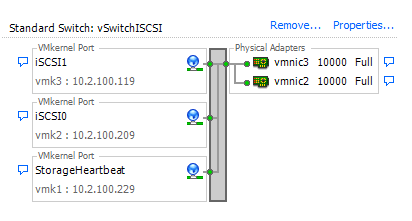
If you follow the install guide for the EqualLogic-ESX-Multipathing-Module and use the setup.pl script for the configuring of a vSwitch or Distributed Switch  (vDS) you'll create two ISCSI vmk's and a storage heartbeat vmk.
vSwitch Setup for just iSCSI
On both of those iSCSI networks you configure Nic Teaming and Failover to only use one of Physical Adapters and mark the other unsed and of course alterternate which one is marked unused for the other ISCSI Network.


The Dell setup.pl script marks the failback to No on each iSCSI Network. So  following these best practices in my setup I would expect that vmk2 traffic could only come out vmnic2 as vmnic3 is set to be Unused. And vise versa vmk3 traffic would only come out vmnic3 as vmnic2 is marked as Unused for it.


However when I SSH to the ESXi host and run "esxtop" and hit "n" for network I see the following showing that vmk2 is infact using that what is suppose to be an "unused" vmnic3.  I pointed this out to Dell and they sais it was odd didn't have any answers yet they ever followed up with me on it. I got asked for vmware supports but not even asked to recreate it.


The Fix

After setting this up every way I could think of; trying it using both vSwitches and Distributed Switches, rebuilding my hosts from CD, trying different ESX hosts with different hardware, tried hosts on different network infrastructure. All with the same issue of it using the incorrect nic.

After all I used the script to create the setup to ensure it was correct and best practice. I create it by hand instead of the script and double checked every setting to ensure everything matched. Still no luck. So of course after it was already time to go home I checked ESXTOP one last time on a ESX host I wasn't finished configuring  and behold it was working correctly. Each vmk was bound to its correct vmnic.

vmk using the correct vmnic
What I hadn't done was set the failback to no yet. Everything else was done.


The Reason this Happened
After doing some reading in this epic post by Joshua Townsend that laid out the resent changes round VMware iSCSI Networking. In fact his quick fix at the time was to in fact turn on failback to no. Looking at the EqualLogic-ESX-Multipathing-Module v1.1.1 setup.pl you can see it following Joshua's quick fix and setting the failback option. I also found the same thing in version 1.1.0. The scripts comments even say that its doing so because of a Vmware bug. However VMware says that bug is now fixed (VMware KB 2008144) and instead looks like setting this option introduces a bug instead.


So if you used the Dell EqualLogic-ESX-Multipathing-Module setup script or followed the install guide you may want to check if you do in fact have this problem because Network throughput, Multipathing and Network Redundancy may not work as you expect.


Wednesday, August 22, 2012

Issue Installing FTP within IIS when you have the Firewall Enabled


So in Windows 2008 R2, there is a bug when installing FTP within IIS when you have the firewall enabled.

After you install the role service, the system automatically sets up the firewall rules needed and enabled them.  One of those inbound rules is “FTP Server (FTP Traffic-In)”.  Though this port should be open you see that if you enable firewall logging its dropping any traffic on this port.   The problem comes from the service “ftpsvc” didn’t get its service SID set correctly.  More on service SIDs can be found at http://sourcedaddy.com/windows-7/understanding-service-sids.html  and http://blogs.technet.com/b/askperf/archive/2008/02/03/ws2008-windows-service-hardening.aspx.

To view the current SID for ftpsvc run the following from a command problem.

sc qsidtype ftpsvc

                (Note: You can’t just use “sc” in PowerShell because “sc” is an alias for Set-Content.)

Which should give the following output.

[SC] QueryServiceConfig2 SUCCESS

SERVICE_NAME: ftpsvc
SERVICE_SID_TYPE:  UNRESTRICTED

This looks correct, but if you run the following command that sets the service sid to what it already is:

sc sidtype ftpsvc unrestricted
               
                Then restart ftpsvc with:

                                net stop ftpsvc
                                net start ftpsvc

The service now works, this has been a problem of over 2 years and a bug report exists at http://connect.microsoft.com/WindowsServerFeedback/feedback/details/524831/default-ftp-firewall-port-21-rule-is-broken-in-windows-2008-r2.  Thank you Transsient77 for the fix.

Tuesday, August 21, 2012

Could not load file or assembly 'System.Web.Mvc, Version=1.0.0.0 ...


Today while updating a previously Visual Studio 2010 Website to use Visual Studio 2012 I got an error building the website in VS2012. The website calls some web services and error occurred any way I tried to build the site.

Reference.svcmap: Could not load file or assembly 'System.Web.Mvc, Version=1.0.0.0, Culture=neutral, PublicKeyToken=31bf3856ad364e35' or one of its dependencies. The system cannot find the file specified. App_WebReferences/WebServiceName/

This seemed odd because I hadn't used System.Web.Mvc in that project and it wasn't used as namespace or an added assembly. After looking around I did find several posts talking about similar issues and my best guess is that one of the used DLL's actually require it.

Solution

While I don't know the exact cause the solution was simple enough. Add the following to the web.conf file.


  .....


 ........


After which I finally found an answer on stackoverflow with the same solution.

When you add  Service References and  use the advance settings and but chose to not reuse types in referenced assembles. If you already added the Service Reference edit by clicking Configure Service Reference on the svcmap.

Add Service Advance Settings - Do not Reuse Types

I currently don't know why either of these fix it and don't have the time today to dig in and figure out why.

Goodluck.

Wednesday, August 15, 2012

VMWorld 2012

I'm surprised  and excited to announce that I"ll be attending VMworld 2012 this year and even more surprised to say I'll actually sitting on a panel to talk about “Doing More with Less” by Leveraging Desktop Virtualization to Reduce Costs While Improving Learning. I'll be speaking about how Northern Kentucky University (NKU) is offering more services to our students and faulty. Offering a better experiences, faster delivery of professor needs, using less time of support staff, and doing it all without spending more than we were previously.

I'll be attending VMworld with Paul Ritter, NKU's Server Team Manager,  so expect additional VMworld posts from us in the coming weeks. Also remember that if you attending VMworld to register for our session and if you have questions please leave them in the comments and I'll attempt to get answers ahead of time.


EUC3380 - Live Panel Discussion on How Education Customers Are “Doing More with Less” by Leveraging Desktop Virtualization to Reduce Costs While Improving Learning


I'll also try and take this chance to release some projects I built for NKU but honestly never got around to publishing or polishing enough for general release.

For an example I wrote a website for reporting VMware View Statistics (a feature sorely missing from the VMware product).

Active Connections from the Statistics Site
I modified the powershell scripts in I use for the Thin Client made using Windows 7 to provide a Lab Status Web Page for students that shows in real time which labs have Thin Clients and how many.


Friday, June 1, 2012

SAP Solution Manager - Web Site not clickable


Working with Solution Manager 7.1 transaction solman_setup I was surprised to fine that while the web page opened; buttons and and links were not clickable. I was using IE 8 and did try comparability mode but no difference. Here's the error in detail.

Message: 'UCF_Properties' is undefined
wd_sise_main_app
Line: 1
Char: 1222
Code: 0
URI: http://:8000/sap/bc/webdynpro/sap/wd_sise_main_app?sap-language=EN
Solution
  1. In Transaction SE38, enter and execute the report WDG_MAINTAIN_UR_MIMES. Under "Menu:, double-click "Delpoy MIMES". Then when that has finished, double-click "Force MIME deployment".
  2. In  Transaction SMICM, choose the "Goto --> HTTP Plugin --> Server Cache --> Invalidate Globally. Click "Yes".
  3. Delete Temporary Internet Files out of Internet Explorer: Tools--> Internet Options --> (General Tab, Browsing History section) Delete.
  4. Make sure that IE  comparability mode  is turned off the close the browser and re-run transaction solman_setup.

Links 

http://scn.sap.com/thread/1974122#10513070


Thursday, May 31, 2012

SAP Solution Manager 7.1 - Path component contains reserved character (':'): K:NaN.exe

Problem


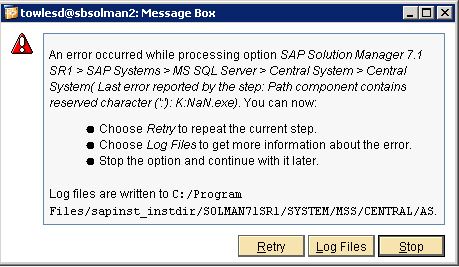
While installing SAP Solution Manager 7.1 SR 1 on Windows with SQL today I ran into the following error trying to run the Installer.


An error occurred while processing option SAP Solution Manager 7.1 SR1 > SAP Systems > MS SQL Server > Central System > Central System( Last error reported by the step: Path component contains reserved character (':'): K:NaN.exe). You can now:

  • Choose Retry to repeat the current step.
  • Choose Log Files to get more information about the error.
  • Stop the option and continue with it later.
Log files are written to C:/Program Files/sapinst_instdir/SOLMAN71SR1/SYSTEM/MSS/CENTRAL/AS/sapinst_dev.log

Solution


From the log sapinst_dev.log it looks like it fails to find the JAVA_HOME Path. 
TRACE      2012-05-31 11:53:48.877
NWDiagAgent.getJavaHome()
TRACE      2012-05-31 11:53:48.888 NWOption(sapjvmHome).value()sTRACE      2012-05-31 11:53:48.888 NWOption.getDefaultValue(sapjvmHome)
TRACE[W]   2012-05-31 11:53:48.891 [ianxcreghelper.cpp:283]           CNTRegistryKey::CNTRegistryKey(., HKEY_LOCAL_MACHINE, Software\JavaSoft\Java Development Kit, ...) Error 2 (The system cannot find the file specified.
) in execution of a 'RegOpenKeyEx' function, line (78), with parameter (Software\JavaSoft\Java Development Kit).
TRACE[W]   2012-05-31 11:53:48.892 [ianxcreghelper.cpp:465]
           CNTRegistryKey::CNTRegistryKey(., HKEY_LOCAL_MACHINE, Software\JavaSoft\Java Development Kit, ...)
The subkey 'HKEY_LOCAL_MACHINE\Software\JavaSoft\Java Development Kit' does not exist on the 'localhost' host.
ERROR      2012-05-31 11:53:48.912 [syxxcpath.cpp:63]
           CSyPathComponent::CSyPathComponent(const iastring& stringValue, bool mightBePrefix)
           lib=syslib module=syslib
FSL-02107  Path component contains reserved character (':'): K:NaN.exe
That wasn't my first guess of course because if you read the Selection 1.1 New Features of

Wednesday, May 23, 2012

SAP - You are not authorized to make changes


Ran into a problem today during a fresh setup of SAP Solution Manager and I found very little about it on google so I thought I would share.

While following the SOLMAN_SETUP Transaction I started to get an error saying "You are not authorized to make changes" when trying to make any changes. This was after I had restarted the configuration and really puzzled me as it had worked a few minutes before and the account I was logged in with was 'ddic'.


After some investigation thinking I had messed something up in the SAP installation or the system corrupted something I noticed that when I reran the SOLMAN_SETUP Transaction I got the following login prompt from Netweaver.


I finally figured out that the SSO Browser Logon ticket was the problem. I had opened another SAP Portal Instance to look at some settings and that had caused the issue. Easy solution to just completely close all the browser windows and rerun the SOLMAN_SETUP Transaction, I had just been I had been over thinking the problem.

More on the SAP Browser Ticket.

Monday, April 2, 2012

Expanded Guide for Windows 8 on VMware View

Last week I started trying to get a Vmware View Pool working for Demoing Windows 8 for users. At my boss's request because we could show what we can do with View and also preventing people from digging up old PCs and laptops to install it on.


I quickly found the post made by Andre Leibovici at http://myvirtualcloud.net/?p=2991 on the steps to creating a VMware Pool of Windows 8 VMs. Great blog by the way. This post was exactly what I was looking for but I ran into a few problems like others in the comments of his blog that I wanted to try and answer if possible.


Normally we can we can install windows and then the VMware Tools followed by the VMware View Agent. Then create a pool selecting that VM to be replicated/cloned. However currently after looking at the logs I believe there is a issue with the VMware View Agent communication with the View Server which shows up as "Waiting for agent".


Waiting for Agent Problem

Before I had started to follow Leibovici's post I tried to create a Windows 8 VMware Automated Pool like I normally would. This is where one of my problems came up. I created the Windows 8 VM, Installed the VMware tools, then Agent and tried to create a Pool. I cloned my windows 8 VM to 5 VMs , customized them and started them. Then started "Waiting for agent". For anyone that has tried this might know this is as far as the VM ever gets. You can see the errors by checking out the logs on both the client and server.

View Agent Log Events Path: C:\ProgramData\VMware\VDM
View Server Log Events Path: C:\ ProgramData\VMware\VDM\logs


At this time I know of no solution for this issue. These VM's do exist in the ADAM Database under the Servers OU but changing the pae-OSVersion has no effect. You'll find the following links talking about it it but none of which provided a solution as of yet.


While I had no luck finding a solution for this I believe its why Leibovici guide has your create a manual pool and connect the Windows 8 vm's as "Other Sources" in order to get around this problem.

Other Sources

If your like me you may never use this feature of View. If so you let me show you it should look like. From inside the VMware View Admin web site expand View Configuration and select Registered Desktop Sources. You'll notice that i have a Zero here because in this screen shot I have not yet successively connected a machine as a Other Source.


This shows you two types of sources Terminal Services Sources and Other Sources. Other Sources is what were interested in. Other Sources are normally Physical machines with the VMware View Agent Installed so that View Offer these machines in a Manual Pool. Because following Leibovici's post we want our Windows 8 VM to show up under Other Sources.

How to Search VMware View ADAM Instance

A few of the VMware View posts I've read recently had people searching for Objects by hand from the Servers OU in the VMware View Adam Database.  I"m not sure if they just didn't feel like explaining how to search it but I figured I'd five a quick guide on how to do this because even in a small View deployment this can be like finding a needle in a hay stack as there can easily be hundreds of objects.

First we need to Connect to the VMware View ADAM instance which I covered here. .

Next Right Click the "Default naming Context..."  and select New, and then Query.


Open a New Query Window. Enter what ever you want for the name.
Most likely for the "Root of Search" you want the to click browse and select the top node.
and finally the Query String you'll need to edit to find what your looking for.

Usually I'm looking for a Pool of Vms or specific VM.

When looking for a pool of VMs with same base name I can use a '*' as a wildcard search. Be sure to replace basename with your vm pool name.


(&(objectClass=pae-VM)(pae-displayname=basename*) )


If I know the full VM name then something like the following.


(&(objectClass=pae-VM)(pae-displayname=FullVMName) )


Play around and see what works. To edit your query right click it choose settings.


You can also use any type of boolean search to do more complicated searches.

Logical Operator Description
= Equals to
& AND
! Not
| OR


Monday, March 26, 2012

Lync Enterprise fails establishing a connection to SQL Server

Today I tried updating are Lync 2010 environment with CU4 in order to add the Mobility Service only to run into issues trying to do the database update. First let me say if you want to do this update please follow an amazing post by ZeroHourSleep. I however had additional issues I believe to be caused by the fact that we have an Standard instance and an Enterprise instance of lync in our enviroment.

The reason for this is because we originality setup Lync to just work for campus internal IM, for this standard was fine. Then our telcom/networking team wanted to deploy Lync as maybe a video and chat service. We get it up and running Lync Enterprise and then telcom/netowrking lost interest and only wanted to look at Cisco systems instead. So now we have both Standard and Enterprise instances deployed with users on both. I left the system as they left it but people are wantingto use the mobility features so now I'm trying to update it and get it working again.

As part of the CU4 updates I tried to use the database update command but I only get errors like the following.

PS C:\Users\towlesd> Install-CsDatabase -Update -ConfiguredDatabases -SqlServerFqdn SQLC2MAIN -SqlInstanceName MAINDB2 -UseDefaultSqlPaths


Install-CsDatabase : Parameter set cannot be resolved using the specified named parameters.
At line:1 char:19
+ Install-CsDatabase <<<< -Update -ConfiguredDatabases -SqlServerFqdn SQLC2MAIN -SqlInstanceName MAINDB2 -UseDefaultSqlPaths
+ CategoryInfo : InvalidArgument: (:) [Install-CsDatabase], ParameterBindingException
+ FullyQualifiedErrorId : AmbiguousParameterSet,Microsoft.Rtc.Management.D eployment.InstallDatabaseCmdlet

After more research I figure out that the enterprise environment machines can not download the Topology.

PS C:\Users\towlesd> Get-CsTopology -asxml
Get-CsTopology : Cannot read topology. Verify that the topology data is accessible.
At line:1 char:15
+ Get-CsTopology <<<<  -asxml
    + CategoryInfo          : InvalidOperation: (:) 
[Get-CsTopology], SqlConnectionException
    + FullyQualifiedErrorId : A network-related or instance-specific error occurred
 while establishing a connection to SQL Server. The server was not found or was not accessible.
 Verify that the instance name is correct and that SQL Server is configured to allow remote connections.
 (provider: SQL Network Interfaces, error: 26 - Error Locating Server/Instance Specified),Microsoft.Rtc.Management.Xds.GetOcsTopologyCmdlet

I find this command finaly which told me the server and database database the enterprise system was trying and failing to connect. (I've change my server name and instance name of course) Run this from the Enterprise Lync Server management Shell.

PS C:\Users\towlesd> Get-CsManagementConnection

StoreProvider : Sql
Connection    : Data Source=(sqlserverfqdn)\(sqlinstancename);Initial Catalog=xds;Integrated Security=True
ReadOnly      : False

Following this I tried to extablish a remote connect myself to that database and instance with Microsoft SQL Server Management Studio. The connection failed which is good because if it had worked I would of been really confused as to what to try next.

I remote to that database server which is the Lync Standard Pool Server. Because its a VM I take a snapshot of the VM just in case something goes wrong. Lets just I once had OCS installed but an OCS  upgrade patch destroyed it and it was easier to just re-install with Lync.

At the Lync standard machine and find that while users are connected just find remote systems can not access its SQL instance. On the Lync Standard server I try to open its SQL Server Configuration Manager.

SQL Server Configuration Manager - Invalid Class.png 

SQL Server Configuration Manager: Cannnot connect to the WMI provider. You do not have permission or the server is unreachable. Note that you can only manage SQL Server 2008 and latter servers with SQL Server Configuration Manager.

Invalid Class [0x80041010]

Looking are round I found a great post by Michael Aspengren on how to fix it here.

C:\Users\towlesd> cd C:\Program Files (x86)\Microsoft SQL Server\100\Shared

C:\Program Files (x86)\Microsoft SQL Server\100\Shared> mofcomp sqlmgmproviderxpsp2up.mof
Microsoft (R) MOF Compiler Version 6.1.7600.16385
Copyright (c) Microsoft Corp. 1997-2006. All rights reserved.
Parsing MOF file: sqlmgmproviderxpsp2up.mof
MOF file has been successfully parsed
Storing data in the repository...
Done!

This cleaned up the issue of SQL Server Configuration Manager not starting. I rebooted here hoping to clear any starting issues SQL might have had but the connections fail all the same. Looking I find that Firewall is turned on and controlled by a GPO policy yet the server is in a Servers OU that is suppose to block GPO that controls firewalls. I added the SQL Server Firewall Ports following the Microsoft guide here.  I added the following rules:
  • Rule to allow TCP 1433
  • Rules for SQL Server when using dynamic ports for a program
    • C:\Program Files\Microsoft SQL Server\MSSQL10.RTC\MSSQL\Binn\sqlservr.exe
  • And be sure to add a rule for the SQL Server Browser to open UDP port 1434 because we are trying to connect to an instances of the Database Engine that is not listening on port 1433.

After opening those and rebooting I was able to remotely connect with with Microsoft SQL Server Management Studio. Then testing from the Lync Enterprise back-end I was finally able to download the Topology.

Downloaded Topology 
Successful

The bottom line is that this was all caused because a GPO turned on a machines local firewall. While I wish I had just checked to that begin with its easy to say that after you've already tracking down the cause.

Getting back to the Lync database upgrade


Working on updated the database still failed.


Result of trying to updating the Lync Enterprise Database
I know this is probably related to having the CS database with the Lync Standard store and my follows will be to move the CS database to the Enterprise database and not the Standard Pool I'd rather fix my current problem before adding more issues or variables.

Lync Database can't Move Central Management Store
I was finally able to update the database as part of CU4 by running it on the Lync Standard Server which held the Central Management Store and then rebooted all the Enterprise Lync Servers.

Install-CsDatabase -Update -ConfiguredDatabases -SqlServerFQDN (lync server)

Other Links

Tuesday, March 20, 2012

Vmware View use of USB Document Camera

Since the roll out of  VMware View has been so successful here at Northern Kentucky University I was asked to look into using VMware View to replace the classroom computers. While I personally believed this wasn't the best fit for VMware View I still figured I would see if it was capable of it from a technical stand point.

One of the requirements for this was the use of External USB devices like document cameras. I borrowed a Epson ELPDC11 and connected it via USB to my Windows 7 machine. Windows 7 found and installed the correct drivers and I followed by loading the document camera software and ensure that it worked on my Windows 7 Machine.

Document Camera working from Physical Machine
Now I closed the document camera software and used VMware View to connect to another Windows 7 VM. On that View VM I installed the document camera software like I did on physical machine. Launching the software it fails to find the document camera; this is expected because I have to tell VMware View to connect to the USB device. To do this from the toolbar chose "Connect USB Device" make sure there is a check next to the Document Camera.

VMware View Connect USB Document Camera

Vmware View Client may fail to connect to the document camera because the device is in use by my physical machine. 


Unable to Connect 'Seiko Epson EPSON ELPDC11' device. Device may be in use by another application."
Unable to Connect 'Seiko Epson EPSON ELPDC11' device. Device may be in use by another application.
unable to connect to Vmwware View USB Device
This is because some software on the physical machine still has control of the device, close the software there and any background process that maybe listening for button presses on the document camera. Once that software is found and closed the View should now allow the USB connection to the device. Windows 7 should now find and install the driver. Once that completes now the document camera software should connect.

Results 

Document Camera  connect to Vmware View
So the VMware View VM successfully connects to the document camera but its very laggy and fails to get a clean picture. This is just a guess but I'd bet the connection is to slow for the constantly updating picture. I left this running for 20 minutes it never managed to sync the entire picture before it continued back to nearly all grey.

My VM's are running hardware version 8 with View Agent 5 on ESXi 5.0. I tested with both VMware View Client 4.6 and 5.0 and while I got slightly better results with 5.0 it wasn't very much. Basically client version 5.0 displays more of the image before going all grey.

I"ve looked for more information but not found much. Vmware says USB redirection performance is affected by processing speed and for my test I was using 2 CPU 3 GHz machine. Luckily we aren't using Hardware Thin Clients because of my previous work on Creating our Thin Clients but I wouldn't think they would provide better results (Let me know if i'm wrong on this).

I've also looked at the Vmware View KB post here for a way to make the USB faster but haven't found any. Looking at thinkvirt.com explains the cause more but no solution.

Friday, March 9, 2012

Blogger Draft Missing "Google Scribe"

I sadly just recently starting using "Google Scribe" in helping to write my blog posts and I can not describe now nice it was. Over the years using IDEs like Visual Studios I've often wished i could have an auto complete for regular writing as well. I was so happy with it I showed everyone in the office.  I found that programmers that often used IDE's love it and others that did not, like my wife didn't see the point. I think they would in time but I was literary in love with it.

However today I began writing a new post only to find the "Google Scribe" option was no longer in Blogger Draft. I can't find a notice or even anyone complaining about it so rather than giving up I figured I'd post something hoping to find others that also miss the feature as greatly as myself.

Blogger In Draft Iintroducing Google Scribe in Blogger

Please bring this feature back, there are few things in technology that completely change the way I work but this was one of them. Here's hoping it comes back soon.


Monday, March 5, 2012

HP Quicktest Professional error with ALM/QC Connection


After installing the HP QuickTest Professional Add-In to the ALM/QC I tried to connect a QTP client to the HP ALM server.
  • After opening the QTP client. 
  • Under File toolbar click "ALM/QC Connection"
  • Enter http://:8080/qcbin/
    • Example: http://SapALM1:8080/qcbin/
  • Check Reconnect to server on startup
  • Click Connect.
Trying to connect runs then after trying to updating the QC connectivity it fails with the following error.

HP QTP Following client components were not downloaded successfully

Following client components were not downloaded successfully:

1. WebClient.dll :
Access is denied.

2. tdclntui.dll :
Access is denied.

3. OTAClient.dll :
Access is denied.

4. tdclient.dll :
Access is denied.
5. bp_exec_agent.exe :
Access is denied.


Close all connections to HP ALM Server and try again

Researching the cause I also found an issue loading the Application Lifecycle Management Web interface failed to load because of Extension manifests merger failed but resolving it did not affect the QTP issue connecting to ALM.


Solution

Figured out it was resolved by starting QuickTest Professional as an administrator. You would think it would work considering I was already logged in as an Administrator account and User Account Control was set to never notify but it didn't work till I right clicked and said to run as Administrator.


Links
http://www.sqaforums.com/showflat.php?Number=676438
http://www.sqaforums.com/showflat.php?Number=534035
http://eyeontesting.com/questions/1014/what-is-required-to-install-qtp-add-in-for-qcalm-without-qtp-installed

Application Lifecycle Management Web interface failed to load because of Extension manifests merger failed

I ran into the following error trying to load the HP Application Lifecycle Management Web interface. My client machine was a Windows 7 VM accessing HP ALM 11.

Following client components were not downloaded successfully:

1. CLoader:
Extension manifests merger failed. See mmerge.log.txt for details.

Close all Connections to Server and try again.


CLoader Extension manifest merge failed
Solution


Turn off Internet Protection Mode and restart Explorer.


Turn Off IE Protected Mode