Pages

Showing posts with label Solution Manager. Show all posts

Friday, June 1, 2012

SAP Solution Manager - Web Site not clickable


Working with Solution Manager 7.1 transaction solman_setup I was surprised to fine that while the web page opened; buttons and and links were not clickable. I was using IE 8 and did try comparability mode but no difference. Here's the error in detail.

Message: 'UCF_Properties' is undefined
wd_sise_main_app
Line: 1
Char: 1222
Code: 0
URI: http://:8000/sap/bc/webdynpro/sap/wd_sise_main_app?sap-language=EN
Solution
  1. In Transaction SE38, enter and execute the report WDG_MAINTAIN_UR_MIMES. Under "Menu:, double-click "Delpoy MIMES". Then when that has finished, double-click "Force MIME deployment".
  2. In  Transaction SMICM, choose the "Goto --> HTTP Plugin --> Server Cache --> Invalidate Globally. Click "Yes".
  3. Delete Temporary Internet Files out of Internet Explorer: Tools--> Internet Options --> (General Tab, Browsing History section) Delete.
  4. Make sure that IE  comparability mode  is turned off the close the browser and re-run transaction solman_setup.

Links 

http://scn.sap.com/thread/1974122#10513070


Thursday, May 31, 2012

SAP Solution Manager 7.1 - Path component contains reserved character (':'): K:NaN.exe

Problem


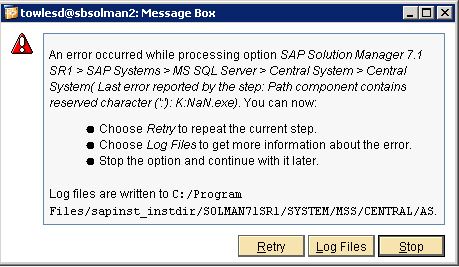
While installing SAP Solution Manager 7.1 SR 1 on Windows with SQL today I ran into the following error trying to run the Installer.


An error occurred while processing option SAP Solution Manager 7.1 SR1 > SAP Systems > MS SQL Server > Central System > Central System( Last error reported by the step: Path component contains reserved character (':'): K:NaN.exe). You can now:

  • Choose Retry to repeat the current step.
  • Choose Log Files to get more information about the error.
  • Stop the option and continue with it later.
Log files are written to C:/Program Files/sapinst_instdir/SOLMAN71SR1/SYSTEM/MSS/CENTRAL/AS/sapinst_dev.log

Solution


From the log sapinst_dev.log it looks like it fails to find the JAVA_HOME Path. 
TRACE      2012-05-31 11:53:48.877
NWDiagAgent.getJavaHome()
TRACE      2012-05-31 11:53:48.888 NWOption(sapjvmHome).value()sTRACE      2012-05-31 11:53:48.888 NWOption.getDefaultValue(sapjvmHome)
TRACE[W]   2012-05-31 11:53:48.891 [ianxcreghelper.cpp:283]           CNTRegistryKey::CNTRegistryKey(., HKEY_LOCAL_MACHINE, Software\JavaSoft\Java Development Kit, ...) Error 2 (The system cannot find the file specified.
) in execution of a 'RegOpenKeyEx' function, line (78), with parameter (Software\JavaSoft\Java Development Kit).
TRACE[W]   2012-05-31 11:53:48.892 [ianxcreghelper.cpp:465]
           CNTRegistryKey::CNTRegistryKey(., HKEY_LOCAL_MACHINE, Software\JavaSoft\Java Development Kit, ...)
The subkey 'HKEY_LOCAL_MACHINE\Software\JavaSoft\Java Development Kit' does not exist on the 'localhost' host.
ERROR      2012-05-31 11:53:48.912 [syxxcpath.cpp:63]
           CSyPathComponent::CSyPathComponent(const iastring& stringValue, bool mightBePrefix)
           lib=syslib module=syslib
FSL-02107  Path component contains reserved character (':'): K:NaN.exe
That wasn't my first guess of course because if you read the Selection 1.1 New Features of

Wednesday, May 23, 2012

SAP - You are not authorized to make changes


Ran into a problem today during a fresh setup of SAP Solution Manager and I found very little about it on google so I thought I would share.

While following the SOLMAN_SETUP Transaction I started to get an error saying "You are not authorized to make changes" when trying to make any changes. This was after I had restarted the configuration and really puzzled me as it had worked a few minutes before and the account I was logged in with was 'ddic'.


After some investigation thinking I had messed something up in the SAP installation or the system corrupted something I noticed that when I reran the SOLMAN_SETUP Transaction I got the following login prompt from Netweaver.


I finally figured out that the SSO Browser Logon ticket was the problem. I had opened another SAP Portal Instance to look at some settings and that had caused the issue. Easy solution to just completely close all the browser windows and rerun the SOLMAN_SETUP Transaction, I had just been I had been over thinking the problem.

More on the SAP Browser Ticket.