Pages

Showing posts with label Pharos. Show all posts

Tuesday, February 5, 2013

Create a Pharos Uniprint Logon Script to resolve ADLDAPLogon.exe Short Falls

I got a few calls from users complaining about our Pharos Clients getting "The username and password could not be authenticated against any servers" error Message. Now while a lot of users where getting this error it was only a small percentage of the over all print jobs. After digging around and putting a call into Pharos Support I noticed that this wasn't just a recent start of errors but rather common. If you want to check for it you can search your alerts or table or use Pharos administrator to and a Custom filter on the alerts.

SELECT        TOP (100) PERCENT message, username, client, time
FROM            dbo.alerts
WHERE        (message LIKE '%The username and password could not be authenticated against any servers%')
ORDER BY time DESC

Cause


Turns out the ADLDAPLogon.exe basically just don't do much checking as to why a username failed. From what testing I did I turns out the following all return the same error.
  • If the username appended with any  SMTP Address of @domain.com to the username
  • If the username is incorrect in that no account in Pharos with that name exists.
  • if the username doesn't match AD
  • .... I'm sure there are others.

Solution 

As such I talking with the Pharos Support Rep they could write a Plug-in that called ADLDAPLogon.exe but that it would be a charged Service on their part. As such I wrote my own this morning and figured I'd share.

The following Script will do the following check and then check if the username and password are correct.

  • Confirm that the Username exists in the Pharos Database
  • That the PlugIn.UserName is not empty
  • That the PlugIn.Password is not empty
  • Remove any @domain.com from the username
This script does require that ADLDAPLogon.exe is in place and configured correctly.

Then Create the Script in under system. Go to your bank, and change the Logon event from useing ADLDAPLogon.exe to use the newly created Logon Script instead. Do a change control and you done.


Good luck and feel free to  use and modify this script to fit your needs. 


//  PlugIn Script: Logon - NKU ADLDAPLogon.exe
// 
//  Billing PlugIn to allow stripping the username of @domain.com before passing to adldaplogon.exe 
//~~~~~~~~~~~~~~~~~~~~~~~~~~~~~~~~~~~~~~~~~~~~~~~~~~~~~~~~~~~~~~~~~~~~~~~~~~~~~~~~~~~~~~~
//  Project:        Pharos 8.3
//  Design:         NKU
//  Date:           5-February-2013
//  Where:          Northern Kentucky University 
//  Who:            Chris Towles written from scratch
//  --------------------------------------------------------------
//  Modifications:
//    02-05-13 Chris Towles : Created to strip the username of @domain.com before passing to adldaplogon.exe 
//   
//
// Description:
//    This Logon Script allows a full email address to be used as the username. It strips the '@' and everything that follows then calls
//
// Requirements:
//    1. adldaplogon be installed and configured
//        C:\Program Files (x86)\Pharos\Bin>adldaplogon.exe --list
//
//  
//~~~~~~~~~~~~~~~~~~~~~~~~~~~~~~~~~~~~~~~~~~~~~~~~~~~~~~~~~~~~~~~~~~~~~~~~~~~~~~~~~~~~~~~
//~~~~~~~~~~~~~~~~~~~~~~~~~~~~~~~~~~~~~~~~~~~~~~~~~~~~~~~~~~~~~~~~~~~~~~~~~~~~~~~~~~~~~~~

// import namespaces
import "DB";
import "Win32";
import "String";  
import "IO";

import "User";

//~~~~~~~~~~~~~~~~~~~~~~~~~~~~~~~~~~~~~~~~~~~~~~~~~~~~~~~~~~~~~~~~~~~~~~~~~~~~~~~~~~~~~~~
// Constants (customizable)
//~~~~~~~~~~~~~~~~~~~~~~~~~~~~~~~~~~~~~~~~~~~~~~~~~~~~~~~~~~~~~~~~~~~~~~~~~~~~~~~~~~~~~~~

//#region Constants

//...string
new sScriptName          = "Logon - NKU ADLDAPLogon.exe";
new sLogPrefix           = "[" + sScriptName + "] -> ";

IO.PrintLine("Solution: " + sScriptName);


// While the path can be hard-coded here as a string, this tends to break in heterogeneous
// environments, e.g. mixed 32- and 64-bit servers.  If possible, install plug-ins relative
// to the Pharos installation folder and query the registry for the starting point:
new sPharosPath = Win32.RegQueryValue("SOFTWARE\\Pharos\\Installed Components", "Path");

// Win32.SearchPath will return the shortened path and file names.
// Be sure to specify the remainder of the path relative to the Pharos folder.
new sADLDAPLogonPath            = Win32.SearchPath(sPharosPath + "\\Bin\\adldaplogon.exe");

//new sADLDAPLogonPath = "C:\\Program Files (x86)\\Pharos\\Bin\\adldaplogon.exe";

new eErrorInvalidUserNamePassword      = "Invalid username or password";
new eErrorInvalidUserName              = "The given username doesn't exist. Please be sure to enter your AD username.";
new eErrorPlugInResultsNotValid        = "Results from Logon plug-in are not valid. Please contact the information desk.";
new eErrorUsernameIsEmpty              = "You must enter a Username.";
new eErrorPasswordIsEmpty              = "You must enter a password.";


// - Logon Plug-in timeout (milliseconds)
new iCmdTimeout = 30000;


//#region Variables
//...boolean
new bResult = false;
new bIsPharosAccountAvailable  = false;


//...integer
new iPos;
new iUserID;


//...string
new UserName = PlugIn.UserName;
new sResultsFile;
new sADLDAPLogonCommand = "";
new sADLDAPLogonResult = "";
new sADLDAPLogonError = "";
new sResult = "";


//---------------------------------------------------------------------------------------
// Functions code
//---------------------------------------------------------------------------------------

function IsAccountAvailable(name)
{
    try
    {
        IO.PrintLine(sLogPrefix + "Get user by logon id.");
        User.GetUserByLogon(name);
        return true;
    }
    catch
    {
        IO.PrintLine(sLogPrefix + "Failed to get user by logon id. Get user by card id.");
        try
        {
            User.GetUserByCardID(name);
            return true;
        }
        catch
        {
            IO.PrintLine(sLogPrefix + "Failed to get user by logon id or card id.");
            return false;

        }
    }

}


//---------------------------------------------------------------------------------------
// PlugIn code
//---------------------------------------------------------------------------------------

//---------------------------------------------------
// Default the script to fail. Set default error
// message to Invalid Username/Password. 
//---------------------------------------------------
PlugIn.Result = false;
PlugIn.Error = eErrorInvalidUserNamePassword;


//---------------------------------------------------------------------------------------
// Clean Up the Username and strip the domain name off of it
//---------------------------------------------------------------------------------------


if (String.IsEmpty(PlugIn.UserName) )
{
    IO.PrintLine(sLogPrefix + " User entered an empty username. Fail the logon.");
    PlugIn.Result = false;
    PlugIn.Error = eErrorUsernameIsEmpty;
}
else { //strip the @Domain.com from the account. 
    
    iPos = String.Find(UserName, "@");
    if (iPos != -1)
    {
        String.Left(UserName, iPos);
    }
    iPos = 0;


    bIsPharosAccountAvailable = IsAccountAvailable(UserName);

    if (bIsPharosAccountAvailable == false)
    {
        IO.PrintLine(sLogPrefix + "User Account doesn't exist.");
        PlugIn.Result = false;
        PlugIn.Error = eErrorInvalidUserName + " : " + UserName;
    }   
    else 
    {
    
        //From now on in the script user "UserName" instead of PlugIn.UserName

        //---------------------------------------------------
        // Check if the user must enter a password (if
        // enabled.
        //---------------------------------------------------
        if (String.IsEmpty(PlugIn.Password) )
        {
            IO.PrintLine(sLogPrefix + "User entered an empty password. Fail the logon.");
            PlugIn.Result = false;
            PlugIn.Error = eErrorPasswordIsEmpty;
        }
        else
        {
            //---------------------------------------------------
            //Verify the users Password
            //---------------------------------------------------

            //adldaplogon.exe out.txt user  
      
            sResultsFile = Win32.GetTempFileName();
            sADLDAPLogonCommand = sADLDAPLogonPath + " " +
                        sResultsFile + 
                        " user " +
                        UserName + " " +
                        PlugIn.Password;
        
            //Write to the Pharos Print Server log Note this would have the username and password
            //IO.PrintLine ( ">sADLDAPLogonCommand :: " + sADLDAPLogonCommand);
        
            Win32.ExecProcess(sADLDAPLogonCommand, iCmdTimeout);
        
            bResult = IO.LoadFile(sADLDAPLogonResult, sResultsFile);
        
            //Write to the Pharos Print Server log
            IO.PrintLine ( "> Logon bResult :: " + bResult);
            IO.PrintLine ( "> Logon sADLDAPLogonResult :: " + sADLDAPLogonResult);

            //Clean Up and delete the Temp Output file            
            IO.DeleteFile(sResultsFile);

            if (bResult)
            {
              //get first line from sADLDAPLogonResult
              sResult = sADLDAPLogonResult;
              iPos = String.Find(sADLDAPLogonResult, "\r\n");
              if (iPos != -1)
              {
                  String.Left(sResult, iPos);
                  String.UpperCase(sResult);
                  String.Delete(sADLDAPLogonResult, 0, String.Length(sResult));
                  String.TrimLeft(sADLDAPLogonResult);
              }

              if (sResult == "FAIL")
              {
                     //ADLDAPLogon Failed
                  iPos = String.Find(sADLDAPLogonResult, "\r\n");
                  sADLDAPLogonError = sADLDAPLogonResult;
                  if (iPos != -1)
                     {
                    String.Left(sADLDAPLogonError, iPos);
                  }

                     IO.PrintLine(sLogPrefix + "ADLDAPLogon.exe returned a FAIL : " + sADLDAPLogonError);
                    
                     PlugIn.Result = false;
                     PlugIn.Error = eErrorInvalidUserNamePassword + " : " + UserName;
                     IO.PrintLine(sLogPrefix + "Returning the user this error : " + PlugIn.Error );
                 }    
              else 
                 {
                    if (sResult == "OK")
                 {
                        // Logon was successful.
                  IO.PrintLine(sLogPrefix + "ADLDAPLogon.exe login was successful for user '" + UserName + "'");
                        PlugIn.Result = true;
                    }
                   else
                    {
               //...Unkown Error 
                        IO.PrintLine(sLogPrefix + "ADLDAPLogon.exe Result was not Valid");
                    PlugIn.Error = eErrorPlugInResultsNotValid;
                    PlugIn.Result = false;
                    }
                 }
              } //end of  if (bResult)
           } //end of password check
        }// Check if Pharos Account exists
    }//End of Username Check

Friday, October 12, 2012

Pharos Mobile Print: Print server Firewall

Pharos was nice enough to let us Demo Pharos MobilePrint and since there isn't much out there on Pharos Mobile Print I thought I'd post a few small things that might help some of you. I'm using Pharos MobilePrint version 1.2.

If your sending email to Pharos Mobile Print it has to verify your email address. From the documentation MobilePrint and Uniprint Integration located on the Pharos install media.
MobilePrint first checks if the user’s email address is in its internal cache (if the user has printed before their address will already be in the cache). If it is not found MobilePrint then checks in the Pharos Database.
If you are sure that the email account is correctly set on the user account. Either from Pharos Administrator or the DB.

SELECT  [user_id]      
,[active]      
,[id]      
,[email]  
FROM [pharos].[dbo].[users]  
where id like 'username1'

If its set and the service is still asking your accounts to register their email address instead it means the Pharos MobilePrint Server for what ever reason can't connect to the Pharos MobilePrint Auth Service. Check that the firewall port is open on the print server. Port 808. However if you have this issue refer to the Mobile Print Installation and Configuration Guide and check all the ports because its likely you have more than just this one firewall port issue.


The Pharos MobilePrint Log, which i set to “c:\PharosLogs” will display the following.

[2012/10/11 15:10:24 PDE8 T018 d MP_ConsignmentTracker] 84e2ba58-9023-561d-af42-3ee75a505f29 Indexing email from 'test1@test.nku.edu'
[2012/10/11 15:10:24 PDE8 T05F d MP_ConsignmentTracker] 84e2ba58-9023-561d-af42-3ee75a505f29 Starting Workflow for sender 'test1@test.nku.edu'
[2012/10/11 15:10:24 PDE8 T05F d MP_ConsignmentTracker] 84e2ba58-9023-561d-af42-3ee75a505f29 Sender email address not in cache
[2012/10/11 15:10:45 PDE8 T025 w MP_WorkflowService] An attempt was made to resume a Workflow Instances that has either completed or been deleted. This request will now be ignored.
[2012/10/11 15:10:45 PDE8 T026 e MP_WorkflowServiceExtension] An error occurred while attempting to process a response on the 'authentication' queue for message '465738ac-0a35-5c90-bfe2-b038a51f7dbd'.
[2012/10/11 15:10:45 PDE8 T026 e MP_WorkflowServiceExtension] Exception: The communication object, System.ServiceModel.Channels.ServiceChannel, cannot be used for communication because it is in the Faulted state.
Type: CommunicationObjectFaultedException
StackTrace:   at System.ServiceModel.Channels.CommunicationObject.Close(TimeSpan timeout)
   at System.ServiceModel.Channels.ServiceChannelFactory.OnClose(TimeSpan timeout)
   at System.ServiceModel.Channels.ServiceChannelFactory.TypedServiceChannelFactory`1.OnClose(TimeSpan timeout)
   at System.ServiceModel.Channels.CommunicationObject.Close(TimeSpan timeout)
   at System.ServiceModel.ChannelFactory.OnClose(TimeSpan timeout)
   at System.ServiceModel.Channels.CommunicationObject.Close(TimeSpan timeout)
   at System.ServiceModel.ChannelFactory.System.IDisposable.Dispose()
   at MobilePrint.Service.Workflow.Extensions.AuthenticationManager.<.ctor>b__0(AuthenticateResponse response)
[2012/10/11 15:10:45 PDE8 T026 e MP_RestInterface] An unhandled error occurred while processing a REST command.
[2012/10/11 15:10:45 PDE8 T026 e MP_RestInterface] Exception: The communication object, System.ServiceModel.Channels.ServiceChannel, cannot be used for communication because it is in the Faulted state.
Type: CommunicationObjectFaultedException
StackTrace:   at System.ServiceModel.Channels.CommunicationObject.Close(TimeSpan timeout)
   at System.ServiceModel.Channels.ServiceChannelFactory.OnClose(TimeSpan timeout)
   at System.ServiceModel.Channels.ServiceChannelFactory.TypedServiceChannelFactory`1.OnClose(TimeSpan timeout)
   at System.ServiceModel.Channels.CommunicationObject.Close(TimeSpan timeout)
   at System.ServiceModel.ChannelFactory.OnClose(TimeSpan timeout)
   at System.ServiceModel.Channels.CommunicationObject.Close(TimeSpan timeout)
   at System.ServiceModel.ChannelFactory.System.IDisposable.Dispose()
   at MobilePrint.Service.Workflow.Extensions.AuthenticationManager.<.ctor>b__0(AuthenticateResponse response)
   at MobilePrint.Core.Workflow.Library.QueueManager.<>c__DisplayClass1`1.b__0(BaseQueueResponse o)
   at System.Reactive.AnonymousObserver`1.Next(T value)
   at System.Reactive.AbstractObserver`1.OnNext(T value)
   at System.Reactive.Subjects.Subject`1.OnNext(T value)
   at MobilePrint.Core.Workflow.Library.QueueManager.PushResponse(String queueName, BaseQueueResponse packet)
   at MobilePrint.Service.Workflow.RestResource.WebResource.PushQueue(String queueName, HttpRequestMessage request)
[2012/10/11 15:10:45 PDE8 T025 w MP_WorkflowService] An attempt was made to resume a Workflow Instances that has either completed or been deleted. This request will now be ignored.
[2012/10/11 15:10:45 PDE8 T026 e MP_WorkflowServiceExtension] An error occurred while attempting to process a response on the 'authentication' queue for message 'e71cfa3f-0d71-52b2-a538-9ab27ed45271'.
[2012/10/11 15:10:45 PDE8 T026 e MP_WorkflowServiceExtension] Exception: The communication object, System.ServiceModel.Channels.ServiceChannel, cannot be used for communication because it is in the Faulted state.
Type: CommunicationObjectFaultedException


Friday, February 10, 2012

How to clone a Pharos Server for Development and Testing Purposes

Currently I'm working upgrade our Pharos 8.1 to 8.2 and thought I'd share how I first work out the upgrade process on a cloned VM of our production Server.
Disclaimer: Before we start, this process is at your own risk and is easy to make very harmful mistakes to your Pharos Environment. If your not clear on what your doing please stop and don't continue until you are clear you will not be harming anything. Also I'm betting this process is not recommend nor supported by Pharos Systems nor am I responsible for any loss or harm to your systems.
I'll note here this process isn't needed if you truly have a development environment that closely matches production and is completely isolated from your production environment. For myself while we have a development environment it doesn't have any were near the printers and clients to consider it a printing development environment. Ours is missing Mac clients because its primarily all VMware VMs.

Firstly clone the production Pharos Server or Servers VM, in and do not run VMware customization on the VM and don'ts power on the newly created VM. If your production Server(s) is not a VM you can do a Physical to Virtual create a VM of it.

Now I don't have the SQL Database on the local Pharos machine but in on a remote SQL cluster. Also there is a static IP Address assigned in the VM so its critical that the cloned VM not be allowed to talk on the production network at all until we're done making our changes. After the VM is cloned remove the Nic from the VM, you could just disconnect it but I want be very sure someone else doesn't reconnect it till I'm ready for it to talk on the network. Also this will allow us to be sure the new Nic doesn't have a statically assigned IP address settings on it.

Thursday, July 14, 2011

Windows 7 Printers Stack when the Same Driver is Used

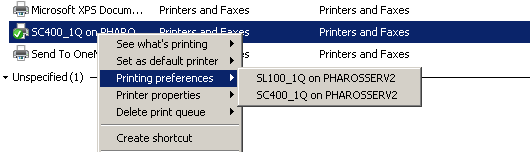
I was working with VMware View today and ran into a odd problem with Pharos Uniprint when I adding printers. I would run the installer to add a printer and it wouldn't be in the printer list. I could refresh the list and sometimes it would appear? I looked at the registry and found both printers to be installed but only one showing. I figured it was a problem with some of my pharos packages so i narrowed it down to two printers that seemed to be the only ones of the 8 that had the problem.

Here is a look at the printers listed in the registry and those displayed to the user.
Notice that the user can't see SL100 in order to print to it despite the fact that its installed. Knowing Pharos so well I assumed that it had an issue with its package installers and rebuilt them top to bottom. I cleared the modules and driver packages and recreated everything. But still on the clients everything remained the same; not working.

Odd enough however when you right clicked the printer it would display options for both printers.
Looking closer both printers use the same Port : PharosPopupPort  and used the same driver. Leaving Windows to make the assumption that the where in fact the same printer.

http://www.thewindowsclub.com/list-printers-using-the-same-printer-driver-seperately-in-windows-7

Tuesday, March 15, 2011

Pharos UniPrint - "Not enough money to print job"

On our new Pharos UniPrint 8.1 system a new error appeared today. "Not enough money to print job". I first figured this was a message I had written in the Pharos billing Plug-in. But looking closer I found that this message wasn't one I had written. and it appeared before my Plug-In "PrintJob -Accept Costs" was called. 

Pharos Not enough Money to print job
The issue only happened when a user had some money in internal balances and then the rest on the gateway balance. I narrowed it down to a feature that when Pharos Billing Plug-In was called the PlugIn.Balance was returned. If the balance wasn't enough the Pharos Popup not enough money to print job appeared. This all makes since but i'd been using the same Billing script in Pharos UniPrint 8.0.

The problem was actually how Pharos UniPrint 8.1 parsed

Friday, February 25, 2011

Pharos - Get Job Cost Methods of Spool Queues

While working on the migration from one Pharos Uniprint server to another I needed to ensure I had all the Job Cost methods set correctly. You can find this information in the Pharos Administrator but in the older server its is only listed by Clicking the Charging tab. However the information is easy to get with SQL.

Pharos Administrator GUI from 8.0
Pharos Administrator GUI from 8.0 showing Job Cost Method

However to get a list of Spool queues and their job cost methods is a really simple query.

SELECT    dbo.job_cost_methods.name AS 'Job Cost Method', dbo.spool_queues.name AS 'Spool Queues Name'
FROM         dbo.spool_queues INNER JOIN
                      dbo.job_cost_methods ON dbo.job_cost_methods.job_cost_meth_id = dbo.spool_queues.job_cost_meth_id
ORDER BY 'Job Cost Method', 'Spool Queues Name'

Monday, February 21, 2011

Pharos Web Servies - Uniprint HTTP Error 500.19

I sort of want to start these Pharos Posts like sesame street. Todays error is brought to you by the Number "500.19". If you don't catch the reference don't worry as its not that funny anyway.

So out of the box install of Pharos Web Services on a Windows 2008 R2 64 bit VM. Navigate to the start page and heres what you'll see the following error/greeting. 


Config Error:

There is a duplicate 'system.web.extensions/scripting/scriptResourceHandler' 
section defined"

Config Source
section allowdefinition="MachineToApplication" name="scriptResourceHandler" requirepermission="false" type="System.Web.Configuration.ScriptingScriptResourceHandlerSection, System.Web.Extensions, Version=3.5.0.0, Culture=neutral, PublicKeyToken=31BF3856AD364E35"


Solution
Not to worry as the fix is a simple one. Following the logic from http://forums.iis.net/t/1149226.aspx. The issue arises becuase its using a .Net 4 Application Pool and unnecessary to load these sections since their loaded in the parent. I tried just commenting out the sections of the web.config that trouble loading when it said there was a duplicate section defined. That worked perfectly so I've included below the resulting working Pharos Uniprint web.config.

Sample of Fixed Pharos Uniprint web.conf


Monday, February 14, 2011

Pharos Interfaces API for Plug-in Scripts

Recently I needed the Pharos Uniprint Plug-in Interfaces to write a few Scripts for our Pharos environment. Interfaces, API, Just something other than taking apart other scripts and guessing at the parameters.

After the trouble finding the normal interfaces that are callable in Pharos Scripts I put in a support call. They replied very promptly however I really find it disappointing that i would really need to use a service all to find it. Maybe you found it but i searched the CD, Chm files, and online with no luck.

Anyway Pharos support got back with and sent me this.
You may find the Pharos Scripting Language Primer by going into Pharos Administrator, and navigating to the Help column in the Menu bar, and go to Help Topics. Then search for Pharos Scripting Language Primer, or go to Pharos Administrator\Technical Information\Pharos Script Primer. You should find what you need there.
And sure enough that was exactally what i was looking for. Its found on the CD under "CD Root\help\Pharos.CHM" open that and then navigate to Technical Information. Look at both Plug-in Interfaces and Pharos Script Primer.

Note: Here is a copy of some of it in hopes that google will lead others here so they can find what I couldn't
Pharos Scripting Language primer and then Plug-in Interfaces below.

Pharos Scripting Language Primer and then Plugin Interfaces below that.


Pharos - Message about your print job

Today while working on migrating our clients from one Pharos Server to a new Pharos Server. I noticed that this popup was seen on the old Pharos system but no the new one.
Pharos "Message about your print job" popup dialog
Since I use several Pharos Scripts in the plug-in's I figured the text for this message must exist somewhere in the scripts. After searching in vain I could not track down the differences in two server's scripts. Finally I found the cause for this message was not in the scripts but rather the Uniprint Global Settings.
Pharos - Uniprint Global Settings
By checking Cost Information and Cost Acceptance the user is notified with the Message about your print Job. Read more about this feature here

This was really a problem for us as I was also using a script to prompt the users to accept charges in another script. Its been that way for 3 years and yet no one as ever complained about having to accept the charges twice. 

Pharos ADLDAP Bank Configuration

Update - 2-5-2013 : Along with this ADLDAPLogon.exe I now use a script to to call it to resolve some issues it has.

This post is about testing and configuring the "ADLDAP Bank" in Pharos.I'll be working from an Pharos 8.1 install on Windows 2008 R2.

You can check that the "ADLDAP Bank"is selected by looking in "Pharos Administrator ->  System -> Print Server -> Bank". If "ADLDAP Bank" is selected we need to go to command line to configure the bank. Open a administrative command prompt and navigate the the following folder and run the list servers option.

cd "c:\Program Files (x86)\Pharos\Bin\"
adldaplogon.exe --list-servers

If only a black line is printed then their aren't any AD servers specified to authenticate against so it fails to return anything when the the bank is called. review the output from logon canceled by plug-in post. Why it doesn't reply that the "Pharos Bank ADLADAP is not configured" is really beyond me.

Anyway we will need a AD account and its username and password. It must belong to a user that the plug-in can use to access the LDAP database; this only needs to be an ordinary user, with no special privileges. however make sure the account doesn't have password expiration enabled on it. I created a service account special for this and labeled it as such aka. pharosldap.

Friday, February 11, 2011

Pharos - Logon cancelled by plug-in

Working with Pharos 8.1 on Windows 2008 R2 configured to use AD Authentication. Pharos clients are getting "Print job 'Untitled - Notepad' failed: Logon cancelled by plug-in" popup message after correctly entering valid credentials.
Pharos Client popup - Logon Cancelled by Plug-in
Looking at the alert error from in "Pharos Administrator -> System -> Alerts" doesn't show a lot more information as to the cause of the message.
Pharos - Pharos Admin Alert for Logon Cancelled by plug-in
To get more information we have to enable the Pharos Print Server logs. To do this follow my other post on how to enable the Pharos Print Server Logging. Once that is done and the Pharos Print Server has been restarted so logging changes take effect, print from the client again which should cause the "Logon cancelled by plug-in" error again and then look at the log.

Configuring Pharos Logging Settings - Pharos Log Setter

By default Pharos Server and client software doesn't do much in they way of logging.  Thats the bad news, the good news is it can log nearly everything we need to trouble shoot stuff if enabled them. This post should give you enough information to enable and disable the Pharos Print Server logs. This really hasn't changed since version 5 through version 8.1 of Pharos.

However for starters we want to be organized as to where we want Pharos to store its log files. This will make our life much easier later rather than looking all over for them. Create a logs folder in which we'll point any logging files we have Pharos generate. Create folder  "C:\Program Files (x86)\Pharos\Logs" if it doesn't exist.

Also A piece of house keeping, any changes to the logging settings requires a reboot of the pharos service associated with that log.

We have two ways of configuring Pharos Logging.

Method 1 - Using Pharos Log Setter

On the Pharos Installation CD there is a folder "<CD Root>\tools\utils\Logsetter"

Copy the entire logsetter folder to the "C:\Program Files (x86)\Pharos\Logs\" folder we created. This is just so we don't need the CD again (most of use have it as ISO and never burned it but anyway) and the next time it will be easier to get to. Launch logsetter.exe from "C:\Program Files (x86)\Pharos\Logs\Logsetter" and enable the logging you require.

All this app does is set the same keys in the registry that we would of set manually. I use the registry myself but really up to you. Also notice you can set logging levels for "Pharos Database Server", "Pharos License Server", "Pharos Print Server", "Pharos LPD Server", "Pharos Popup Server" and "Pharos Administrator".

Pharos Log Setter

After any Changes a server restart is require for the logging level and enabling or disable to take affect.

Method 2 - Modifying the registry

Then there is always the method of just modifying the registry directly to set the logging options we want.

For example set the following key.

HKEY_LOCAL_MACHINE\SOFTWARE\Wow6432Node\Pharos\Print Server\Log = "C:\Program Files (x86)\Pharos\Logs\PrintServerLog.txt"

In that same registry location we call also change the logging level.

Don't forget to restart the services for Logging settings to take effect.


Important Note: Since these log files can get so large I find it useful to stop the service after i make a logging level change or just trouble shooting a problem. Delete the log file and then restart the service. This prevents me from having to know where at in the log this service started logging.

Links
http://pharos.custhelp.com/app/answers/detail/a_id/626/~/pharos-logsetter-utility

Pharos UniPrint - Print Queue Not Found

I've done a far amount of work with Pharos Systems, in particular, Uniprint.  Honestly I hate the product but thats what I'm forced to work with it anyway. One thing I've always hated about it was the complete lack of any results when researching problems online and by lacking I mean normally ZERO RESULTS. As such you should see large number of posts as I work on migrating our Pharos Print Servers from Windows 2003 to a new Windows 2008 R2 environment. Hopefully someone else finds these useful.

Here's an example of problems I've seen people run into.

If you install the Pharos package on a client and then attempted to print to it you may get this following "Print Queue can Found" popup. Thats your only hint, nothing else as there appears to be no error log of this anywhere on the client side. Later I'll tell you where to enable some logging for this but for this example the solution is simple. The only cause I've seen for this so far was because a Change Control is needed on Pharos server due to queue was just created or maybe a name change.

Pharos Popup Message - Print Queue Not Found


To enable that logging on the client popup you can insert the folling registry value.

To get errors back from the popup client you need to enable it to log to a file.
HKEY_LOCAL_MACHINE\SOFTWARE\Wow6432Node\Pharos\Popup Monitor\Log\Filename = "C:\Program Files (x86)\Pharos\bin\Popuplog.txt"
Here is an example output of the this Popuplog.txt log.

[2011/02/11 12:47:46 P548 T1318 d] -> NPM::StartDocPort
[2011/02/11 12:47:46 P548 T1318 d] [NPM::StartDocPort] hPort=0x00000000045EF770 pPrinterName='AC220_1 on DEVPHAROSSERV1' JobId=00016 Level=1 pDocInfo=0x00000000042FEF08 {pDocName='Untitled - Notepad' pOutputFile='(null)' pDatatype='RAW'}
[2011/02/11 12:47:46 P548 T1318 d] -> SPrintInfo::StartDocPort
[2011/02/11 12:47:46 P548 T1318 i] PrintServer:DEVPHAROSSERV1
[2011/02/11 12:47:46 P548 T1318 i] PrintServerIpAddress:DEVPHAROSSERV1
[2011/02/11 12:47:46 P548 T1318 i] SpoolQueue:AC220_1
[2011/02/11 12:47:46 P548 T1318 d] -> SPrintInfo::GetJobFilePathAndName
[2011/02/11 12:47:46 P548 T1318 d] <- SPrintInfo::GetJobFilePathAndName
[2011/02/11 12:47:46 P548 T1318 i] WorkStation(MachinaName):\\LABVM2
[2011/02/11 12:47:46 P548 T1318 i] UserName:towlesd
[2011/02/11 12:47:46 P548 T1318 i] Document:Untitled - Notepad
[2011/02/11 12:47:46 P548 T1318 i] Pages:1
[2011/02/11 12:47:46 P548 T1318 d] -> SPrintInfo::FreePopupData
[2011/02/11 12:47:46 P548 T1318 d] <- SPrintInfo::FreePopupData
[2011/02/11 12:47:46 P548 T1318 d] -> StartPopupClient
[2011/02/11 12:47:46 P548 T1318 d] -> ExecPopupClient
[2011/02/11 12:47:46 P548 T1318 i] Pharos Path:C:\Program Files (x86)\Pharos
[2011/02/11 12:47:46 P548 T1318 i] Exec Popup Client:C:\Program Files (x86)\Pharos\bin\POPUPCLI.EXE "Global\aa0c04aa-adf3-4765-b542-62b153b5f24e"
[2011/02/11 12:47:46 P548 T1318 d] -> CreateProcessInUserSessionAndWait
[2011/02/11 12:47:49 P548 T1318 d] <- CreateProcessInUserSessionAndWait
[2011/02/11 12:47:49 P548 T1318 i] Exec Popup Client, result=1, exit code =0
[2011/02/11 12:47:49 P548 T1318 d] <- ExecPopupClient
[2011/02/11 12:47:49 P548 T1318 d] <- StartPopupClient
[2011/02/11 12:47:49 P548 T1318 d] <- SPrintInfo::StartDocPort
[2011/02/11 12:47:49 P548 T1318 d] <- NPM::StartDocPort
[2011/02/11 12:47:49 P548 T1318 d] -> NPM::WritePort
[2011/02/11 12:47:49 P548 T1318 d] [NPM::WritePort] hPort=0x00000000045EF770 pBuffer=0x00000000048151D0 cbBuf=33965
[2011/02/11 12:47:49 P548 T1318 d] <- NPM::WritePort
[2011/02/11 12:47:49 P548 T1318 d] -> NPM::EndDocPort
[2011/02/11 12:47:49 P548 T1318 d] [NPM::EndDocPort] hPort=0x00000000045EF770
[2011/02/11 12:47:49 P548 T1318 d] -> SPrintInfo::EndDocPort
[2011/02/11 12:47:49 P548 T1318 d] -> SPrintInfo::FreePopupData
[2011/02/11 12:47:49 P548 T1318 d] <- SPrintInfo::FreePopupData
[2011/02/11 12:47:49 P548 T1318 d] -> SPrintInfo::Cleanup
[2011/02/11 12:47:49 P548 T1318 d] -> SPrintInfo::GetJobFilePathAndName
[2011/02/11 12:47:49 P548 T1318 d] <- SPrintInfo::GetJobFilePathAndName
[2011/02/11 12:47:49 P548 T1318 d] <- SPrintInfo::Cleanup
[2011/02/11 12:47:49 P548 T1318 d] <- SPrintInfo::EndDocPort
[2011/02/11 12:47:49 P548 T1318 d] <- NPM::EndDocPort